Generating...

Script to edit, on one canvas
Author every frame.
Icarus is a desktop production tool that puts generative AI inside real production craft. Sketch it, generate it, stage it in 3D, composite it and cut it, all on one node-based canvas. The models generate. You author.
Windows now · Mac coming · $9 a month, compute at cost
01 — What Icarus is
A production tool, not a prompt box.
Icarus is a desktop production tool for filmmakers that combines generative AI with professional production technique. You build a project by connecting nodes on the canvas: script, breakdown, designs, storyboards and shots all live in a shared library. 3D staging, hand-drawn art tools, compositing and a non-linear editor all live in the same workspace, so a change upstream flows through to the cut.
The stance is simple. Use generative tools where they win. Use traditional craft where control matters. Keep the author in charge of both.
Generative where it wins
The leading image, video and audio models, on your own accounts.
Craft where control matters
A Paint interface, a 3D stage, compositing tools and an editor that do exactly what you tell them.
One canvas, script to edit
Every stage of the production in one project, on your computer.
Artists don't just want output — they want to make something.
02 — Who Icarus is for
For people who make films, not people who pull levers.
Icarus is for filmmakers, directors, small studios and agencies who want generative AI inside a real production process, not as a slot machine.
Independent creators and directors
Take a project from script to boards, previz or finished shots, on one machine.
Small studios, freelancers and agencies
Produce pitches, previz and commercial work, and bill generation to the client at cost.
Production artists
Add generative steps to the way you already work, and hand results off cleanly to your editor.
What gets in the way, and what Icarus does about it
Spend that runs away
Every paid run shows its expected cost first, and every run is recorded against the project, so the total is never a surprise.
Getting locked into one model company
Icarus works across providers. Switch models or providers without losing work, starting over or learning a new interface.
Keeping your universe consistent
The same character, prop and location stays recognizably itself from storyboard to final shot, because every stage works from the project's Library.
Tools that fight craft
Generation sits next to familiar controls: a 3D stage with a camera, a timeline, an edit, before-and-after comparison and export to your editor.
Losing good work
Results, takes and versions are kept, so a new generation never silently overwrites a good one.
03 — What it does
Every step is a decision you make.
A project goes from a script to a finished, exportable cut without leaving the canvas. At each stage you get the controls a craftsperson expects, with generation as one tool among them.
Sketch to generate
Start from your drawing, not a sentence.
Rough out the frame in Paint, with layers and pen pressure, then generate from it. Your sketch sets the composition, the staging and the shapes, and the model renders the look. A Reference Set holds your cast and style alongside it, so the frame belongs to your project.
Stage in 3D
Build the world. Then place the camera.
Build a set, place stand-ins and generated props, light them and block a camera move on a timeline in the 3D workspace. Work in four views, key the camera, and use Aim to keep a subject framed through the move. Pose figures from body capture.
Render the layout and generate the shot from it. Camera and animation layout are decisions you made, not ones a model guessed.
Deterministic compositing
Finish the shot without leaving Icarus.
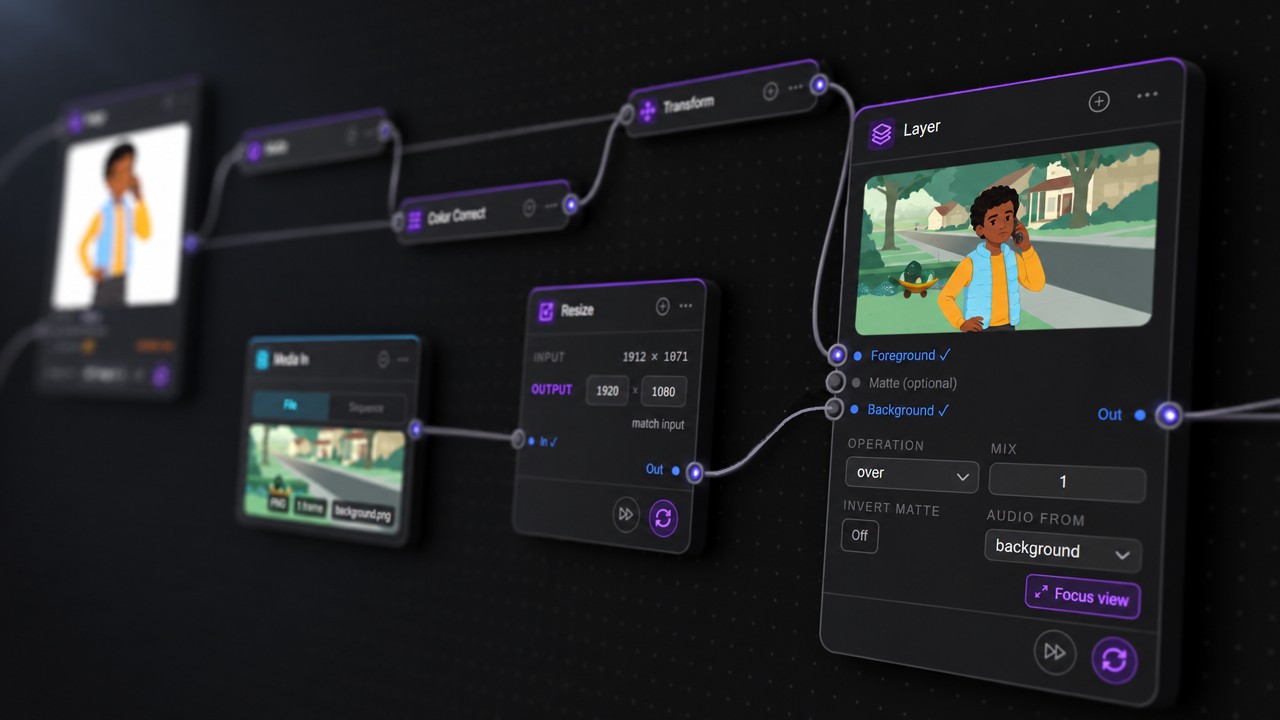
Generation is where you want variation. Everything after it should do exactly what you tell it. Matte, Transform, Layer, Color Correct, Paint and Filters for grain, glow, halation and lens effects sit in the same graph as the models, with a large before-and-after view to judge the result.
No exporting to another app and bringing it back. Most of it runs on your computer and costs nothing to run.
Story in the Edit
Build the story, not just the shots.
Cut boards and clips to time in the Edit, with trims, four audio lanes and takes you can switch without losing the others. Save named versions of the cut and reload any of them.
When it's ready, export to Premiere, Resolve, Media Composer or Vegas and keep going in the editor you already use.
The whole pipeline, in one project.
Project Context reads your script and project documents into beats, shots, principal characters and style. From there, every stage reads from and writes back to the same Library, so your universe holds together from the first board to the final cut.
Works with the leading image, video, audio and 3D models through the providers you already use. See the providers and models.
04 — What makes it different
Built around the person making the film.
Two things set Icarus apart before you make a single frame: you always know what your work costs, and your work is never tied to one provider.
Cost tracking
Know what a shot will cost before you make it.
Every paid run shows its expected cost on the node, before it runs. Every run is then recorded against the project, including runs that fail part-way, so you always know what a shot, a sequence or a whole job has cost.
You pay providers directly, with no markup, so your project's spend record is ready to pass through to a client at cost.
- Expected cost on every paid run, before it runs
- Spend recorded per project, failed runs included
- An unknown cost is shown as unknown, never as $0
- Local tools like compositing and filters cost nothing to run
Same node. Same wires. Any provider.
Across providers
Change providers. Keep everything else.
Icarus is a workspace, not a storefront for one model company. Your projects, Library, graphs, takes and generation records stay on your computer, whichever provider runs the shot.
Moving to a different model or provider is a choice on the node. Your references stay wired in, your boards and your cut stay put, and there's no new interface to learn. When a better model ships, it can be added without waiting on a platform.
Your models, your accounts
Use your favorite models and existing credits.
Connect the provider accounts you already have, and Icarus works with them, credits and all. Generation goes straight from your computer to the provider, on your own keys, with nothing added on top.
- Higgsfield
- Magnific
- Oxen
- World Labs
- Viggle
- Kie
- fal
- OpenRouter and more
Availability depends on each provider and changes as new models ship.
*Applies to API accounts
And the principles behind them
01
The whole pipeline, not one trick
Script, boards, 3D staging, shots, compositing and the edit live on one canvas. A change upstream flows through to the cut.
02
Production craft next to generation
A real 3D stage with a camera, keys and a timeline. An edit with trims and takes. A focus view with before and after. Generation is one tool among the ones a studio already trusts.
03
Your work stays yours
Projects, graphs, media and the record of what was generated live on your computer. We never see your projects, prompts or keys. And a lapsed subscription never locks you out: your projects still open and export.
04
Honest software
Icarus tells you when a model ignores a reference or a file can't be used. It refuses rather than guessing silently.
Pricing
Pay for the software. Compute at cost.
The subscription unlocks generation. You pay each provider directly, on your own account, at their price. Icarus adds no markup and handles no payments for generation.
Icarus Indy
$9 /monthor$90 /year
- The full canvas, from script to edit
- Your own provider keys, no markup
- Expected cost before every paid run, spend tracked per project
- Switch providers anytime, with nothing to rebuild or relearn
- Projects always open and export, subscribed or not
Windows now, Mac coming. Download as a zip and sign in with the email you purchased with.
Questions
What does generating cost?
You pay each provider directly, at cost, with no markup. Icarus shows the expected cost before every paid run and records what you spent per project, including runs that fail part-way.
Can I switch providers in the middle of a project?
Yes. Choose a different model or provider on the node. Your references, Library, takes and cut stay as they are, and the generation record keeps track of which model made what.
Which models can I use?
The leading image, video, audio and 3D models, through the providers you connect with your own keys, including the credits you already have with them. Icarus isn't tied to any one model company.
What platforms does Icarus run on?
Windows now. A Mac version is coming.
Where does my work live?
Your projects and media stay on your computer. Generation uses the providers you choose. Your projects, prompts and keys are never sent to us.
What happens if my subscription lapses?
The subscription unlocks generation. Without it, your projects still open, graphs load and exports run.
How do updates work?
Icarus tells you when a new version is ready. Download it and you're on the latest.
What are the system requirements?
[MINIMUM SYSTEM REQUIREMENTS]
Stop pulling the lever. Start making the film.
Know the cost before you run. Use any provider. Keep every frame.
Get Icarus